Elevate Projects with Sakura Flowers Watercolor Branch Clipart
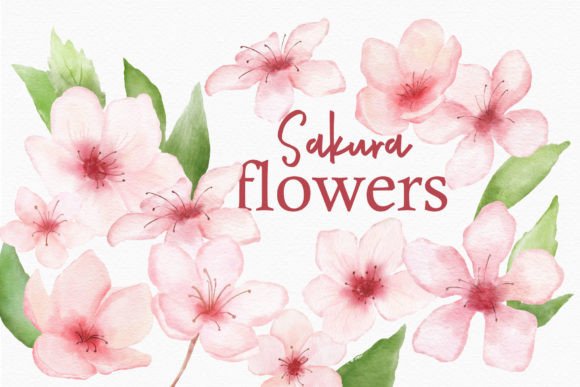
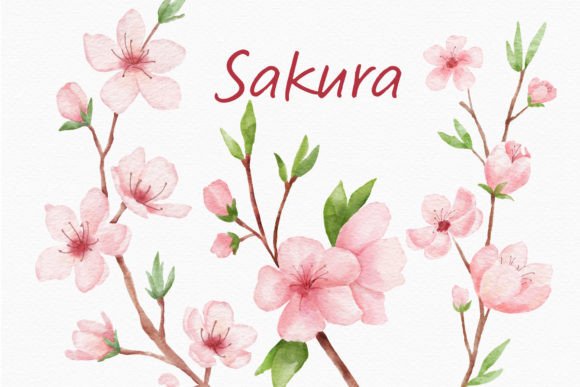
When you’re designing a digital product or a physical invitation, the details often tell the story. The Sakura Flowers Watercolor Branch Clipart set offers more than just pretty pictures; it provides a specific mood. These aren't flat, vector graphics that feel sterile. Instead, they are organic, hand-painted elements that carry the softness and fluidity of real watercolor. You receive three distinct transparent PNG images, rendered at a crisp 600 DPI. This high resolution is crucial because it ensures that whether you are working on a small web banner or a large-scale poster, the texture of the paper grain and the bleed of the paint remain visible and professional.
The personality of these elements is undeniably romantic and delicate. Sakura, or cherry blossoms, symbolize renewal and the fleeting nature of beauty. When translated into watercolor, that symbolism deepens. The colors are vibrant yet soft, blending seamlessly into one another. Because the files are pre-colored and ready to use, they eliminate the guesswork often associated with digital painting. However, it is worth noting that screen calibration varies. While the images are optimized for display, the colors you see on your monitor might shift slightly once sent to a commercial printer. For designers working on print design or packaging design, running a test print on your specific paper stock is a wise move to ensure the blush pinks and sage greens match your brand vision.
Practical Applications for Modern Creators
The versatility of the Sakura Flowers Watercolor Branch Clipart makes it a valuable asset in any digital library. For graphic designers and marketers, these elements are perfect for adding a human touch to otherwise digital-feeling layouts. Imagine using them to frame a pull quote on a blog post or to soften the edges of a corporate newsletter during a spring campaign. They work exceptionally well in editorial design, where breaking up long blocks of text with organic shapes can improve reader retention and flow.
For entrepreneurs and small business owners, specifically those in the lifestyle, beauty, or wedding industries, these graphics serve as immediate brand identifiers. You can overlay them on social media graphics to create cohesive Instagram stories or use them as background elements for Pinterest pins. They are also incredibly effective for greeting cards and party invitations. Because they are PNG files with transparent backgrounds, you can layer them over textures, photos, or solid color blocks without worrying about awkward white boxes surrounding the image. This flexibility allows for complex, layered compositions that look professional and intentional.
Integrating Watercolor Elements into Brand Identity
Building a brand identity is about consistency and emotion. If your brand voice is gentle, natural, or artisanal, the Sakura Flowers Watercolor Branch Clipart can become a recurring visual motif. Using these elements consistently across your website headers, email signatures, and product labels creates a subconscious connection with your audience. It signals that your brand pays attention to aesthetics and values beauty. This is a subtle form of visual hierarchy; the eye is naturally drawn to the color and texture of the watercolor, making it an effective tool for highlighting key information like a "Buy Now" button or a special announcement.
When incorporating these assets into web design, consider the contrast. Watercolor can sometimes be visually "noisy," so placing text directly over a dense cluster of branches might hurt readability. Instead, use the branches to frame the text or place them in the margins. This preserves the legibility of your typography while still benefiting from the decorative flair. Whether you are using a sans serif font for a modern, clean look or a serif font for something more traditional, the organic nature of the sakura branches provides a beautiful counterpoint to structured letterforms.
Technical Tips for Best Results
To get the most out of these design assets, you need to treat them with the same respect you would a premium font. Just as you wouldn't stretch a script font until it distorts, you should be mindful of how you scale these images. While 600 DPI offers a lot of room to play with, extreme enlargement might eventually reveal pixelation. Always check the resolution relative to your final output size.
Another practical consideration is file management. Since you are receiving transparent PNGs, they are ready to drag and drop into most software, from Adobe Photoshop and Illustrator to Canva and Procreate. However, because watercolor relies on semi-transparency to look realistic, be careful when applying heavy filters or color overlays. The soft edges of the petals are what give the clipart its charm; harsh editing can destroy that nuance. For those looking to create a cohesive suite of marketing materials, try using just one small sprig from the set as a favicon or a bullet point icon, saving the fuller branches for hero images and posters. This creates a visual rhythm that guides the user through your content naturally.