Enchanting Watercolor Papers for Magical Projects
Capturing the Whimsy of Forest Dwellings
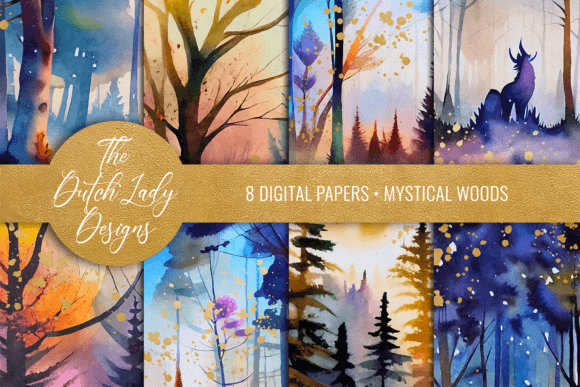
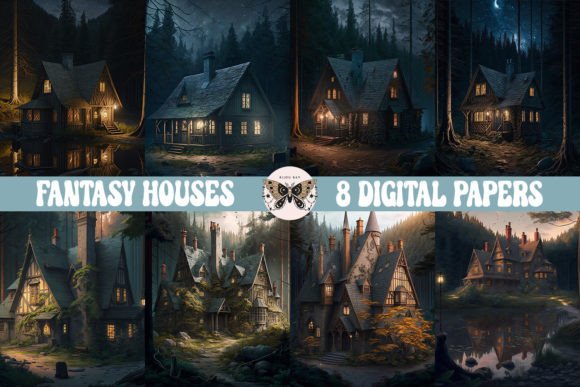
There is something undeniably magnetic about the concept of a home hidden deep within a forest. Whether it is a hobbit hole nestled into a hillside or a treehouse connected by rope bridges, these structures represent a retreat from the modern world. Our new digital paper set captures this specific longing for escapism. When you open these files, you aren’t just looking at a background; you are stepping into a scene painted with soft watercolor washes that mimic the look of traditional illustration. The visual style relies on a muted, earthy color palette—think mossy greens, slate blues, and weathered wood tones—blended with the unpredictable, organic texture of wet-on-wet watercolor techniques. This aesthetic avoids the harsh, flat look of standard vector graphics, offering instead a handmade feel that invites the viewer to linger.
The "personality" of this set is distinctively rustic yet magical. It balances the rawness of nature with the fantasy of architecture. You will notice soft edges and gentle bleeds in the color application, which gives the artwork a sense of age and authenticity. This is particularly effective for projects that require a storybook quality. Unlike a generic stock photo, these images have a narrative depth; they suggest that behind every brushstroke lies a hidden path or a glowing window. For designers, this texture provides an immediate emotional hook. It sets a mood of nostalgia and comfort before a single word of text is even added to the layout. If your goal is to create a sense of wonder or a cozy atmosphere, the visual language of these papers does the heavy lifting for you.
Practical Applications for Creators and Entrepreneurs
Understanding where to apply a resource like this is key to maximizing its value. While these files are marketed as digital papers, their utility extends far beyond simple scrapbooking. For the small business owner, these textures serve as a powerful tool for packaging design. Imagine wrapping a handmade candle or a bar of artisanal soap in a paper featuring these soft, forest-inspired washes. It immediately elevates the product from a simple item to a premium gift, communicating care and attention to detail. Similarly, for content creators and bloggers, these images are perfect for breaking up long blocks of text. Using a section of the watercolor as a header background or a pull-quote box can guide the reader’s eye and make the reading experience more enjoyable.
For those involved in social media graphics and digital marketing, the 300 dpi resolution ensures that your visuals remain crisp even when cropped or zoomed. The 12x12 inch format is versatile; you can easily slice a vertical strip for a Pinterest pin or use the full square for an Instagram post. The "Fantasy Houses in the Woods" theme works exceptionally well for seasonal campaigns—particularly autumn and winter—or for brands that focus on storytelling, such as independent bookstores, authors, or children’s education platforms. Furthermore, because these are digital assets, they can be used to create mockups for web design portfolios. If you are a designer pitching a concept for a nature retreat or a cozy bed-and-breakfast, laying out your typography over these images can help the client visualize the final brand identity instantly.
Integrating Texture with Modern Typography
One of the challenges of using detailed watercolor backgrounds is ensuring that your text remains legible. This is where the choice of typeface becomes critical. Because the "Fantasy Houses in the Woods" set has a lot of organic movement and texture, you generally want to pair it with a clean sans serif font or a sturdy serif font for body text. Avoid overly ornate script fonts or complex handwritten fonts for long paragraphs, as the visual noise of the watercolor combined with the irregular letterforms can make reading difficult. Instead, use decorative fonts sparingly for headlines, perhaps in a solid color that matches the darkest shade in the watercolor, and rely on a neutral typeface for the details.
When working with these files in image editing software, consider the opacity and layering. You might find that reducing the opacity of the paper slightly allows your text to pop more, or you could use a subtle drop shadow on your headings to create depth. This interaction between the background and the foreground is a staple of good editorial design. It forces you to think about hierarchy. The watercolor acts as the emotional anchor, while the typography provides the necessary information. By mastering this balance, you turn a simple JPEG into a sophisticated layout. These files are not seamless, which means they are best used for standalone pieces like postcards, posters, or single-page flyers rather than tiling across a massive website background. Treat them as individual canvases rather than repeating patterns.
Smart Asset Management and Workflow
Before incorporating these assets into your workflow, it is helpful to do a quick inventory of your design assets folder. Having a set of high-quality textures like this can save you hours of work. Instead of trying to paint a watercolor background from scratch or hunting for a royalty-free image that fits the specific "enchanted forest" vibe, you have a ready-made foundation. For marketers, this speed is essential. You can quickly mock up a campaign concept for a client without spending billable hours on illustration. For hobbyists and crafters, it allows you to focus on the fun part—arranging your photos and embellishments—rather than worrying about the technical aspects of creating the background art.
Keep in mind that these files are in JPEG format. While JPEGs are excellent for maintaining color quality and keeping file sizes manageable, they do not support transparency natively. This means you will need to use masking tools in your editing software if you want to cut out specific shapes or blend the edges of the paper into white space. If you are printing these for physical products, always do a test print first. Watercolors can look different on screen than they do on paper, especially regarding the vibrancy of the colors. The 300 dpi specification is the industry standard for high-quality printing, so you can be confident that the edges of the "houses" and the texture of the "trees" will look sharp on cardstock. Ultimately, this collection is about adding a layer of handcrafted charm to your digital workflow, bridging the gap between the convenience of technology and the warmth of traditional art.